Free. No card, no plan.
Restaurant reporting software that shows the checks behind every number
Sales, orders, what is still unpaid and how it was paid, for any day, week or month — added up from the checks your staff already take. Open a day and every check is there, one tap from its slip. The app is free and the reports come with it: no add-on, no per-screen or per-device charge.
No card needed. Runs in the browser or the app.
What restaurant reporting software is
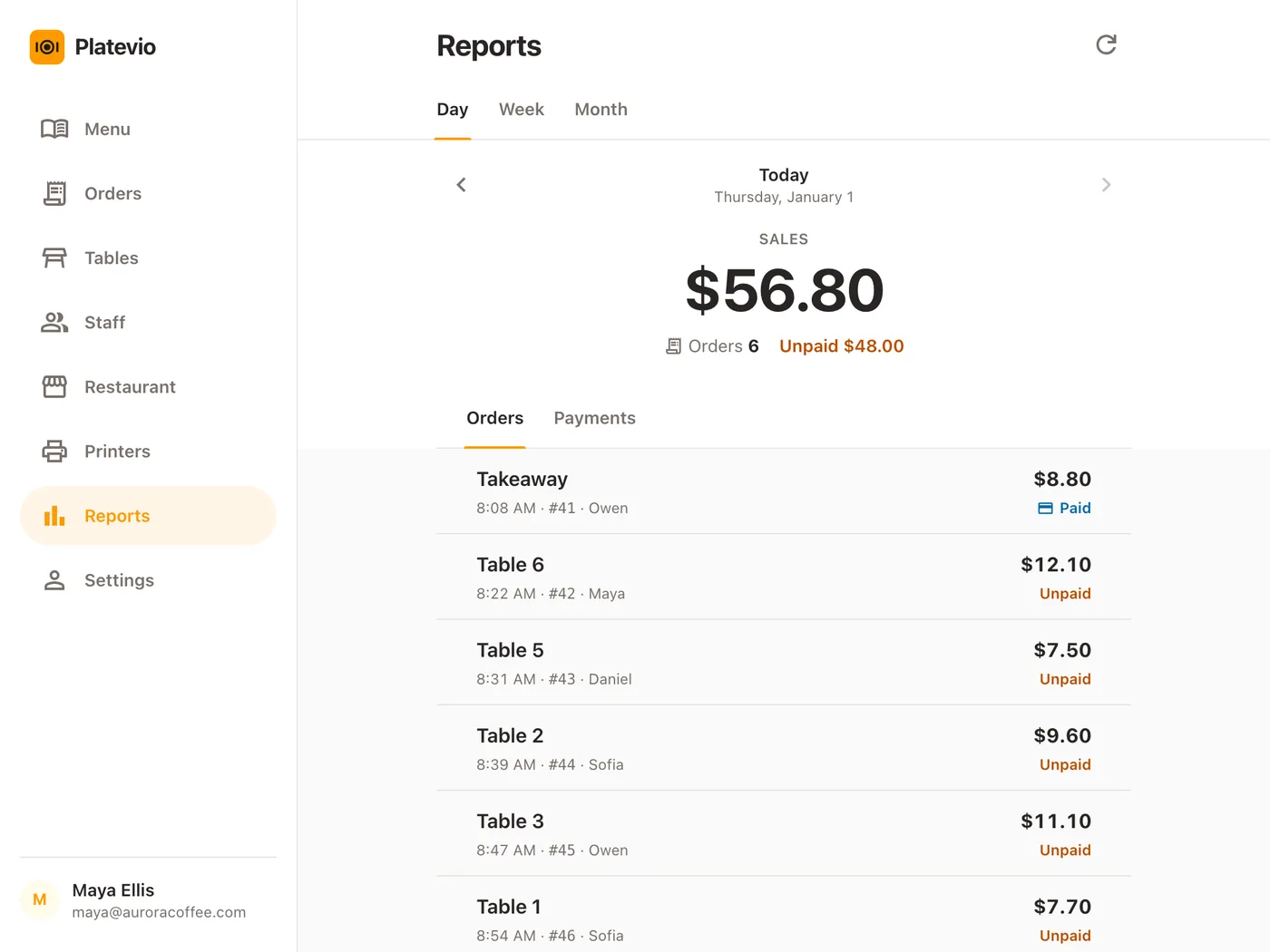
Reporting software turns the checks a point of sale records into the figures an owner runs the room on: what was sold, how it was paid, and what is still open. Most people meet it as the POS report, and above all as the end-of-day report — the one a cash register prints as the Z report — the day’s sales, split by how guests paid. Read the same figures over a week or a month and the trade calls it restaurant analytics; it is the same idea with a longer ruler. In a point of sale the report is not a separate product: it is built from the orders already taken, so nothing is typed into it at the end of the night.
-
The day’s total
Sales, and how many checks made them. One figure to read at the close and to set against last Friday.
-
How it was paid
Each payment method’s share of the day — card, cash and whatever else the till takes — and what is still owed on the open checks.
-
The period
The same figures for a week or a month, day by day, so a slow Tuesday and a strong Saturday sit side by side.
-
The checks
The orders underneath the figures, which are the only way to check a number.
A report the checks write, not one somebody types up
A daily sales sheet is written at the close, from memory and a pile of slips, and it is exactly as right as whoever filled it in at one in the morning. In Platevio the report is added up from the checks themselves, as they are opened and paid. Nobody writes it.
-
Nothing to re-type
Every check the floor takes is in the day from the moment it opens. The close is a glance, not a task.
-
It adds up by design
The payment rows plus the Unpaid row always equal Sales. There is no column to reconcile because nobody filled one in.
-
Every past day stays open
Any day, week or month back to the one you opened in is a few taps away, with the figures it had that night.
One day’s report, from the first check to the close
A café-bar on a Friday, from the first coffee to the Monday morning look back, with nobody writing anything down.
-
07:30
The first check
A waiter opens a check on table 2 from their own phone. From that moment it is part of today’s sales, and what it still owes shows as Unpaid.
-
13:10
Lunch, paid three ways
Tables settle by card, by cash, and one of them splits the check by dish. Each method builds up its own row on the Payments tab, and the split check gives each its part.
-
16:00
A look from anywhere
The owner, away from the room, opens Reports on their phone: Sales, Orders and Unpaid for Today. Refresh brings every figure up to the minute.
-
01:40
Last round
The final table pays well after midnight. Its check was opened on Friday, and a business day runs from 6am to 6am, so it counts on Friday.
-
01:55
The close
Unpaid reads All paid. The Payments tab says how much of the day came in by card and how much in cash, each with its share of sales. The day’s report is done, and nobody typed it.
-
Mon 09:00
The week
The owner opens Week: seven days, each with its sales and orders, and Friday marked Best day. One tap opens Friday and its checks, and one more opens the check that looks odd.
What the report gives you
Eight things, and every one of them is on the screen today.
-
Sales, orders and unpaid, at a glance
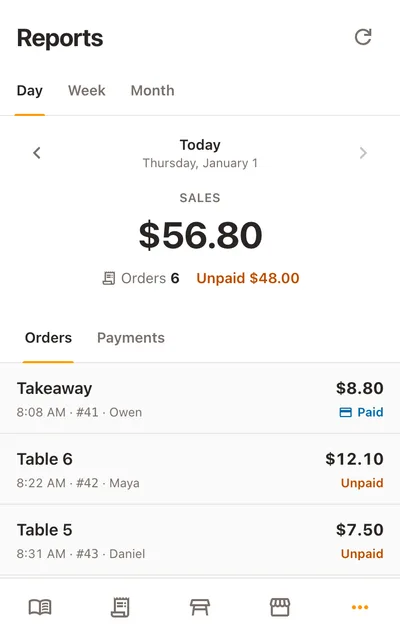
One large Sales figure for the period, with the number of orders beneath it and what is still owed — or All paid, once every check is settled.
-
Any day, week or month
Tabs for Day, Week and Month. Reports opens on today, and ‹ › steps one period at a time, back to any day since the restaurant was created.
-
Payments by method
Cash, card, cheque, meal voucher and any method you name yourself, largest first, each with its share of sales. The payment rows and the Unpaid row add up to Sales.
-
Every check behind the day
Each check the day opened, oldest first, with its table, the time, its number, who opened it, its total and whether it is Paid, Unpaid or Cancelled. Tap any one to open it.
-
A week or a month, day by day
Every day with its sales, its order count and anything still unpaid, with the top-selling day marked Best day. Any day opens to its own checks, with the way back to the week.
-
A day that ends when you close
The business day runs 6am to 6am and weeks start on Monday, so a late night stays whole and a weekend never splits across two weeks.
-
Voids stay on the record
A check voided dish by dish stays on the day’s list, struck through and left out of the totals. A check entered by mistake can be deleted by an owner or administrator, and it leaves the day’s figures.
-
The books stay with the owner
Only owners and administrators see Reports, and the server enforces it on every read. Waiters and cooks take orders without seeing the figures.
Every number opens to a check
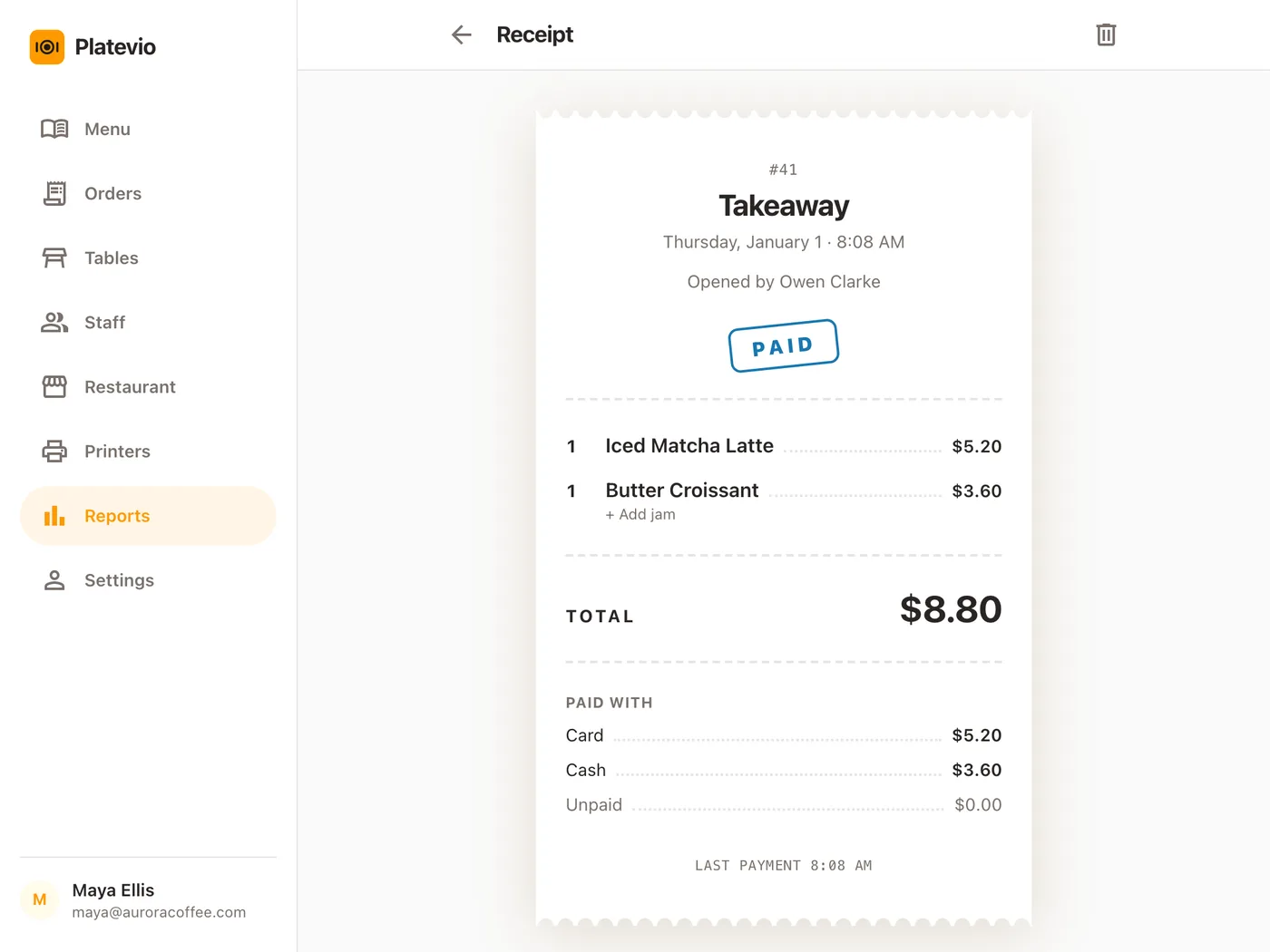
A total you cannot open is a total you have to take on trust. In Platevio every figure is the sum of checks you can read. Tap a check on a day and it opens as a slip: the table, the date and time it opened, who opened it and who added to it, and a stamp that says Paid, Unpaid or Cancelled. Then every dish with its quantity, extras and note, the total, and Paid with — each method and its amount, and anything still owed. A check split across card and cash shows both. When a figure looks wrong at the end of the night, the answer is two taps away, and Back returns to the same day.
Questions about restaurant reporting
- What is restaurant reporting software?
- The part of a point of sale that adds the checks up into sales, orders and payments for a day, a week or a month. In Platevio it is built in and free — no per-screen, per-handheld or per-user fee — and every figure opens to the checks behind it.
- What is a POS report?
- A summary of what the point of sale recorded over a period. Platevio’s shows sales, the number of orders, what is still unpaid and each payment method’s share, with the checks underneath.
- What does a restaurant end-of-day report look like?
- The day’s sales, how many checks made them, how guests paid — card, cash and the rest — and anything still open. In Platevio that is the Day view, and the day runs to 6am so a late service stays whole.
- How do I make a daily sales report for my restaurant?
- You do not type one. Every check your staff take goes into the day as it is opened, so the Day view is the report, finished when the last table pays. Yesterday and every day before it stay one tap back.
- What should a restaurant sales report include?
- Total sales, the order count, the split by payment method, what is unpaid, and the checks themselves so any figure can be traced. Week and Month add the day-by-day line and mark the best day.
- Can I see my restaurant’s reports on my phone?
- Yes. Reports runs in the phone’s browser and is laid out for it: one sales figure and one list. The same page is in the app, and on a tablet or a laptop.
- Who can see the reports?
- Owners and administrators. Everyone else on the team takes orders without seeing the figures, and the server refuses their reads, not just the screen.
Open your restaurant tonight
It takes a minute: your restaurant, your first menu, and you are taking orders.