The restaurant POS system that runs on what your staff already carry
Platevio is a cloud restaurant POS: orders, kitchen, floor and bills in one browser tab or one app. No terminal to buy and no card processor to sign with.
What a restaurant POS system actually is
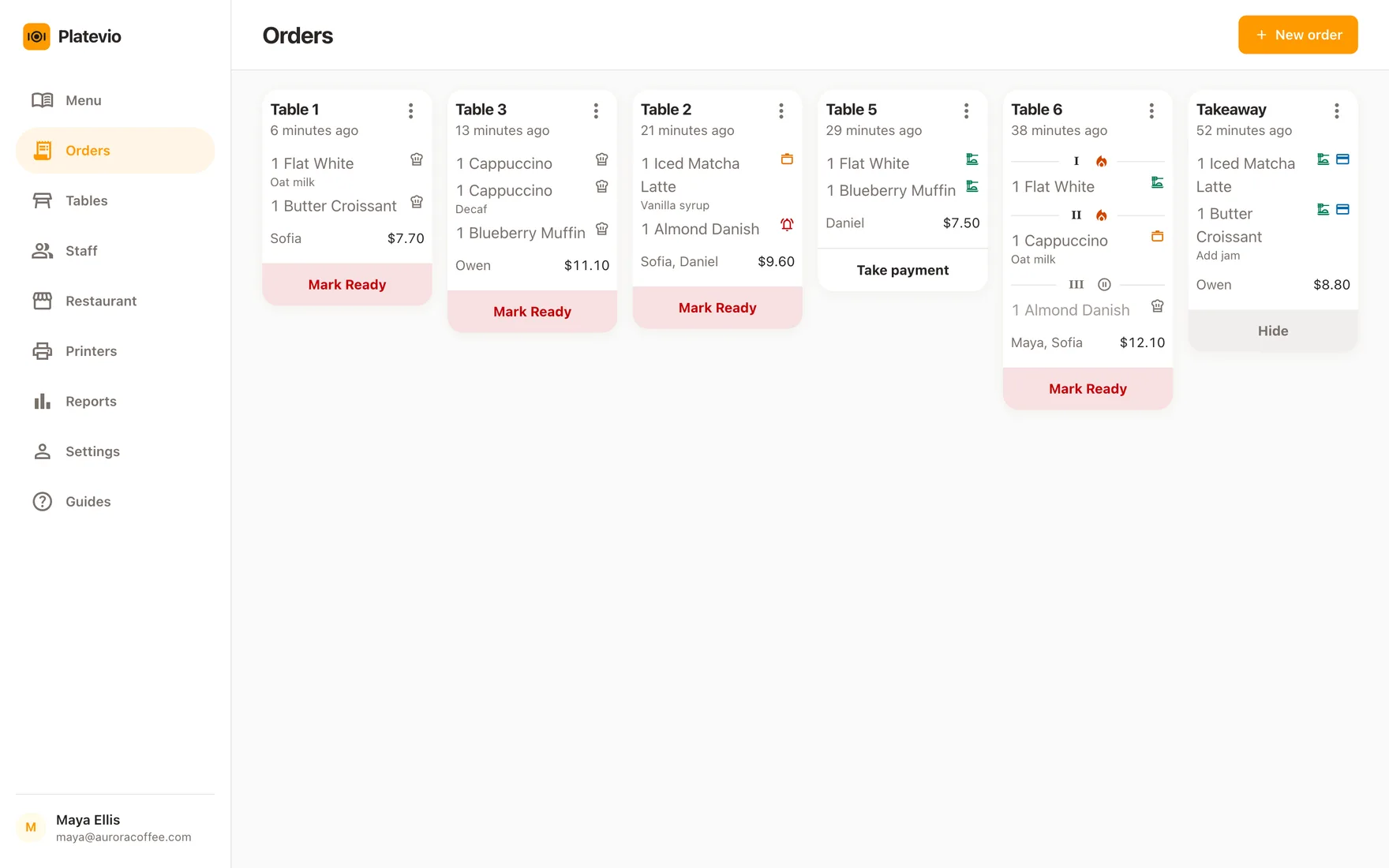
A restaurant point of sale system is the software your floor takes orders on, plus whatever hardware you run it on. Restaurant POS software, restaurant POS solutions, POS programs for restaurants: the category goes by many names, and restaurant point of sale systems all come down to the same thing. It is the one place an order exists between the moment a guest says it out loud and the moment the table pays: the waiter enters it, the kitchen reads it, the floor tracks it, and the bill adds it up. Everything else a POS is sold with — inventory, payroll, loyalty, marketing — is built on top of that single loop, and a system that gets the loop wrong will not be rescued by the modules bolted to it. A legacy POS keeps that loop on a box in the back office and dies with the box. A cloud POS keeps it on a server you do not own, which is why a cloud system can be opened from a phone at the pass, from the office upstairs, or from home at midnight when you want to know what Saturday did.
-
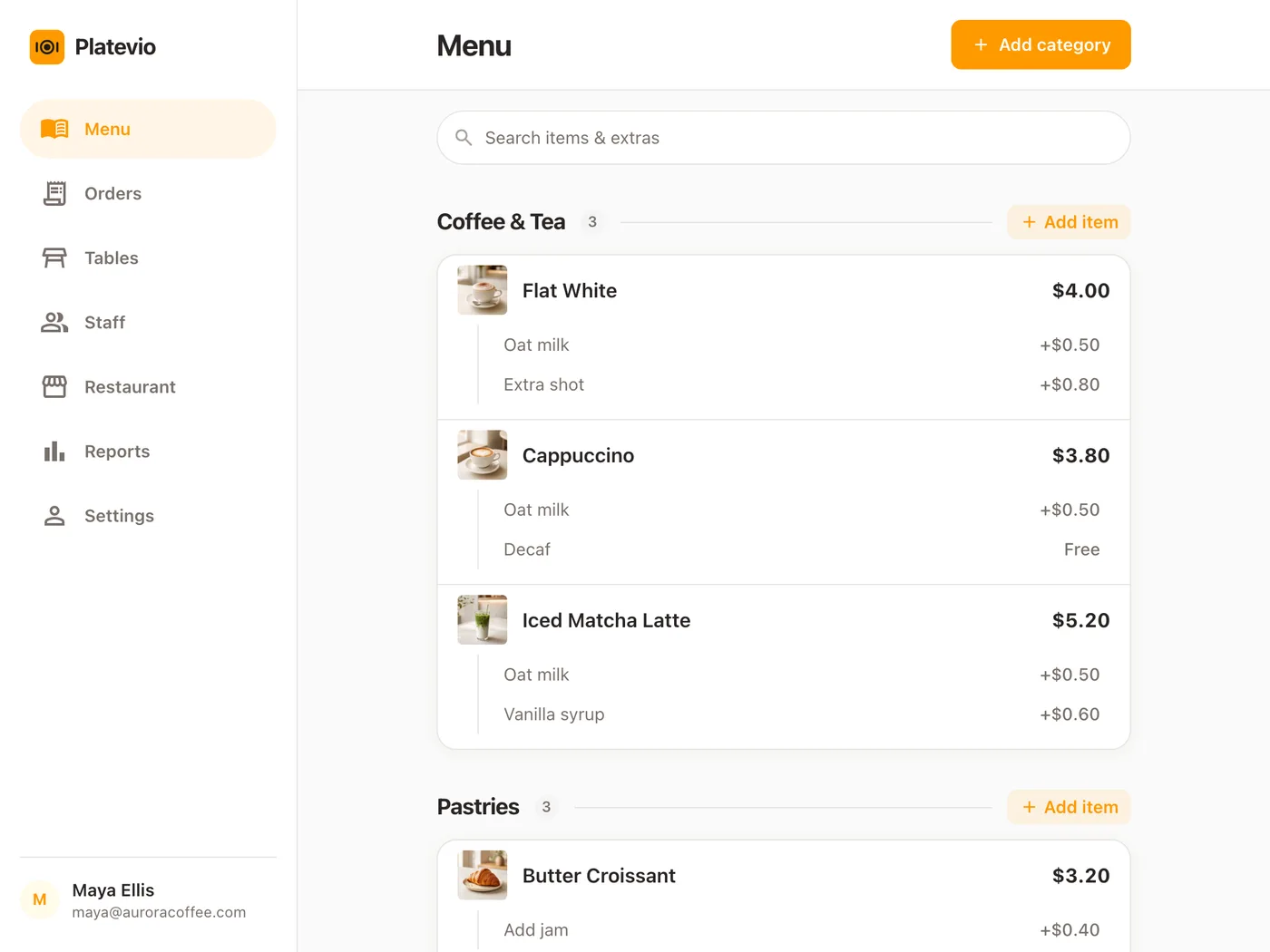
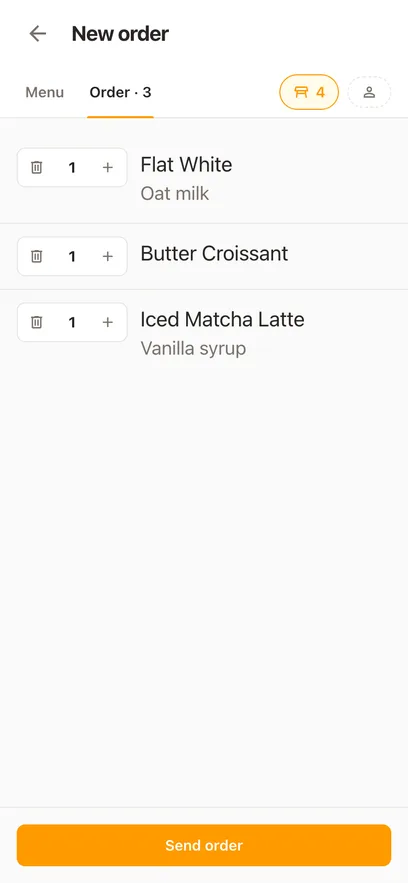
The order screen
Your menu, laid out to be hit fast by a thumb during a rush. Items, extras, notes, and a way to correct the mistake a guest changes their mind about.
-
The kitchen side
Where a sent order becomes a ticket the line can read — either on a screen at the pass or on a printer beside it. Notes and extras have to survive that trip or the guest gets the wrong plate.
-
The floor
Which tables are seated, which are waiting on food, which are ready to pay. On paper this is a host stand and a good memory; in a POS it is a map of the room.
-
The bill
What each table owes, split however they want to split it, and marked paid when the money arrives — whether that is cash, a card machine, or a transfer.
-
The hardware
A terminal, a tablet, a card reader, a receipt printer, a cash drawer, a kitchen screen. Most of it is optional. Almost none of it has to be bought from the company that sold you the software.
-
The reports
What sold, when, and by whom. Every system claims this; the useful question is whether you can read it on your phone on a Monday without exporting anything.
What a restaurant POS system costs in 2026
Software is quoted per month and per station, and the published range across the market runs from nothing to a few hundred dollars a month. Hardware is the number that surprises people: a single-station setup with a terminal, a printer and a drawer starts in the hundreds and a full room with handhelds and kitchen screens runs into five figures. Then there is card processing, which is where the real money is — a percentage of every plate you sell, forever, and often on rates you cannot renegotiate because the terminal only speaks to one processor. Add it up honestly and a first year on a mainstream restaurant POS lands somewhere between a few thousand dollars and twenty, per location.
| Typical restaurant POS | Platevio | |
|---|---|---|
| POS software, per month | $0 – $500 per station | Free — no plan, no per-station fee |
| Terminals, printers, drawers | $400 – $12,000 up front | Nothing — it runs on your phones and tablets |
| Card processing | 1.5% – 3.5% of every sale | None. We are not your processor |
| Add-on modules | $10 – $100 each per month | There are no tiers to be upsold out of |
| Contract | Commonly 1–3 years, auto-renewing | None. Stop whenever you like |
Ranges are what the market publishes, not a quote from any one vendor — what you pay turns on how many stations you run and how hard you negotiate. Platevio is free because we are building it with the rooms using it, not because a free tier is bait for a processing contract. When we do charge, it will be for the software.
Cloud, browser based, and what that actually buys you
A cloud based POS system — cloud POS, web based point of sale, the same thing under three names — keeps your menu, orders and sales on servers you reach over the internet instead of on a machine in the back office. Every device in the building reads one live service, so a price you change on the tablet is already on every phone, and Saturday’s numbers are readable from anywhere. The pages are built small, so they load on the signal at the back of a stone-walled room and on the oldest tablet in the drawer. What it runs on, device by device, is its own page.
-
Every device reads one service
Two waiters, a counter tablet and the kitchen screen all read the same orders off one server rather than each keeping a copy. Nothing has to be synced, reconciled or walked across the room.
-
No install night
It is a web address, and an app for whoever wants one. New devices join by opening it; new versions reach every screen on their own. There is no install night and no version drift between stations.
One order, end to end
The whole product is this loop. Everything else exists to make it shorter.
-
11:52
The order is taken at the table
Tap the item, add the extras, add the note about the nut allergy, send it. No paper ticket, no shouting across the room, no second trip to a terminal by the till.
-
11:53
The kitchen has it
Every item lands on the kitchen screen with its extras and its note attached. Cooked, then served — one tap each way, and back again when a plate comes back.
-
12:14
The floor knows where everything stands
The room is a map. A table shows what it is waiting on and what has already gone out, so anyone walking past can answer the question without finding the waiter who took it.
-
12:19
The table pays and turns
Mark what was paid — the whole bill or the three plates one guest is covering. The table clears, and it is ready for the next two covers.
What you get
Written for cafés, bars and small restaurants — the rooms where the person choosing the POS system is also working the floor on Friday.
-
Runs on hardware you already own
An iPad, an Android tablet, a phone, a laptop — anything with a current browser. Hand-me-down devices included; the pages are built small on purpose. There is no proprietary terminal, so there is no proprietary terminal to strand you.
-
A menu you can actually keep up to date
Categories, items, prices, descriptions and extras, edited from the same device you take orders on. Changing a price at 8pm is a job for the floor, not for after close, and a dish that runs out is switched off on every phone at once.
-
Extras and notes reach the cook
Oat milk, extra shot, sauce on the side, table six is in a hurry. It goes on the ticket in the order it was said, not into somebody’s memory between the table and the pass.
-
The kitchen axis moves both ways
Mark an item cooked, then served — and take it back when the plate returns. Most systems only let a ticket advance, which means a returned plate has to be handled by shouting.
-
A floor plan of your actual room
Lay out the tables the way they really sit, in an editor you drag. Each one shows its state at a glance: seated, waiting on the kitchen, ready to pay, settled.
-
Split the bill by what people ate
Mark individual plates paid rather than dividing a total by four. The line that was covered stays covered; what is left is what is still owed.
-
Everyone sees their own job
Owners, managers, waiters and cooks each get the part of the service that belongs to them. Invite staff by email; a role can be changed or revoked between shifts.
-
Twenty-six languages
English, Spanish, Arabic, German, French and twenty-one more — the whole app, not a translated menu screen. Your currency is set on the menu, so every price carries your own symbol.
-
Receipts and kitchen tickets on a printer you already own
Print over WiFi, Ethernet, USB or Bluetooth to ESC/POS and Star Micronics printers, Arabic receipts included. Nothing is proprietary and nothing is rented from us: the printer already behind your counter stays where it is, driven from the same device the order was taken on.
Reporting you can read on a Monday
Reporting is a section here rather than a page of its own, because reporting is not a product — it is what falls out of a service that was recorded properly in the first place.
-
What the service actually did
Orders, items and their extras, as they were sent and as they were paid. The record is the service itself, not a nightly summary of it.
-
Readable from anywhere
Same browser, same login, from the office or from home. There is nothing to export to see it and no back-office machine that has to be switched on.
-
Every figure opens to a check
Day, week or month, with the sales split by how they were paid. Tap a check and it opens as a slip: who opened it, what was on it, and how it was settled.
Every part of the service, free
Open any part of the service to see how it runs through a shift. All of it comes in the one free app: no card, no plan, and no fee per device, per screen or per user.
-
Kitchen Display
A free kitchen display system that runs in a browser on a tablet you already own. Every open check lands on one board as the floor sends it, every dish carries its own status, and there is no charge per screen.
-
Order Taking
A free restaurant order taking app: waiters take orders on their own phones with extras, notes and courses, see what is ready at the pass and split the check by item.
-
Kitchen Printer
Tickets print themselves when the order is sent, and each kitchen printer gets only its own dishes. WiFi, Ethernet, USB or Bluetooth; ESC/POS and Star Micronics. Free.
-
Table Management
Free restaurant table management software. Draw your rooms and tables as they are, then watch each table’s state and the plates waiting at the pass, live.
-
Reporting
Free restaurant reporting software: sales, orders, what is still unpaid and payments by method for any day, week or month — and every check behind the numbers, one tap away.
-
Menu Management
Free restaurant menu management software that runs in a browser. Change a price or mark a dish out and every phone on the floor has it at once. No per-device fee.
-
Staff Management
Invite the whole team free. Each person signs in on their own phone with a Role that fits the job, and their name is on every order. No fee per user, seat or device.
Built for your kind of room
A bar and a bakery do not run the same service, and the POS that suits one can be a daily irritation in the other. These are the rooms Platevio is written for.
How to choose a restaurant POS system
Worth asking of any of the restaurant POS systems you are shortlisting, this one included. If a salesperson will not answer one of these plainly, that is the answer.
-
Am I locked into your card processing?
Many systems require their own processor, which means the rate you were quoted is the rate you keep, and leaving means replacing the hardware too. Ask what your effective rate is after every fee, not the headline percentage.
-
What does the hardware cost, and whose is it?
Proprietary terminals are the thing that makes switching expensive later. Hardware that only speaks to one vendor is a bill you pay once and a decision you pay for repeatedly.
-
How long is the contract, and how does it end?
Multi-year terms that auto-renew unless you give notice in a specific window are common. Ask for the cancellation clause in writing before you sign, not after.
-
Can a new hire learn it in one shift?
A demo is run by somebody who knows where everything is. Have an actual waiter take five orders on it during a busy hour and watch where they hesitate.
-
Does it run on the devices I already own?
Ask whether the phones, tablets and laptops in the building will do, or whether the quote assumes new terminals. Software that runs in a browser turns every device you own into a station.
-
What is extra?
Online ordering, kitchen screens, extra stations, reporting tiers, support. Get the list of add-ons and their prices, then re-add your monthly total.
-
Can I get my data out?
Your menu, your sales history, your customers. If the answer is a support ticket and a CSV somebody has to build for you, that is a lock-in you only find when you try to leave.
Switching from the POS you have now
The reason most rooms stay on a system they dislike is the cost of leaving it — hardware they already bought, a processor they are tied to, a term that has nine months left. None of those apply here.
-
Nothing to buy first
You can try Platevio on a phone in your pocket during a quiet Tuesday, alongside whatever you run now, without unplugging anything.
-
Your menu is an afternoon
Categories, items, prices, extras. Most small rooms have it in before service; a large one is an evening.
-
No term, no notice period
There is nothing to cancel. If it does not suit the room, stop using it.
Questions people ask before switching
- What is a restaurant POS system?
- It is the software your floor takes orders on and the hardware it runs on. An order is entered on it, the kitchen reads it from there, the floor tracks it, and the bill is settled on it. Everything else a POS is sold with is built on that loop.
- How much does a restaurant POS system cost?
- Across the market, software runs from nothing to about $500 per station per month, hardware from a few hundred dollars to five figures depending on the room, and card processing takes 1.5% to 3.5% of every sale. A first year commonly lands between $3,000 and $20,000 per location. Platevio is free to use, needs no hardware you do not already own, and takes no percentage because it does not process your cards.
- Is Platevio really free?
- Yes. There is no card to enter, no plan to pick and no trial that expires. We are building it with the venues using it. When we do charge, it will be for the software — not as a percentage of your sales, because we are not in the payments business.
- Is there a free POS system for a small restaurant?
- Platevio is one. Most systems advertised as a free restaurant POS are free software attached to a card processing contract, which is where the cost actually lives. Platevio does not process cards, so there is no percentage behind the zero.
- Do I need to buy a POS terminal or a card reader?
- No. Platevio runs in a browser on the phones, tablets and laptops you already own. Cards are still taken on whatever reader or terminal you use now; Platevio records the payment against the bill.
- What is restaurant POS software?
- The software half of a restaurant POS system: the order screen, the kitchen view, the floor plan, the bill and the reports. Platevio is restaurant POS software you open in a browser, so the hardware half is whatever phones, tablets and laptops you already have.
- What is a cloud based restaurant POS system?
- One that keeps your menu, orders and sales on servers reached over the internet rather than on a machine in your back office. Every device sees the same service at the same moment, changes reach the floor immediately, and no device has to be updated by hand.
- Can the whole team use it at the same time?
- Yes. Every device reads the same service off one server rather than holding a copy of its own, and a change made on one reaches the others without anybody reloading. Owners, managers, waiters and cooks each see the part that belongs to their role, and you invite staff by email.
- Can we split a bill?
- Yes, by what people actually ate. You mark individual items paid rather than dividing a total, so a guest covering three plates settles those three and the rest of the table stays open.
- Does Platevio print receipts or kitchen tickets?
- Yes. Receipts and kitchen tickets print to thermal printers over WiFi, Ethernet, USB and Bluetooth — ESC/POS and Star Micronics, Arabic receipts included — and the kitchen can read the same order from a screen instead, or from both.
- Can I mark a dish as sold out mid-service?
- Yes. Set the dish to unavailable and it is struck through on every waiter’s phone at once, so nobody sells the last portion twice. Set it back the next morning and it is on the menu again.
- What languages does it work in?
- Twenty-six, from English, Spanish and Arabic to Japanese, Korean and Ukrainian — the whole app, not just the menu. Each person picks their own, so one waiter can work in Polish while another works in English. The currency is set per menu, so every price carries your own symbol.
- Am I locked into a contract?
- No. There is no term, no notice period and no hardware bought from us that would be stranded if you left. If it does not suit your room, stop using it.
Open your restaurant tonight
It takes a minute: your restaurant, your first menu, and you are taking orders.