Free. No card, no plan.
Restaurant table management software that draws your room the way it is
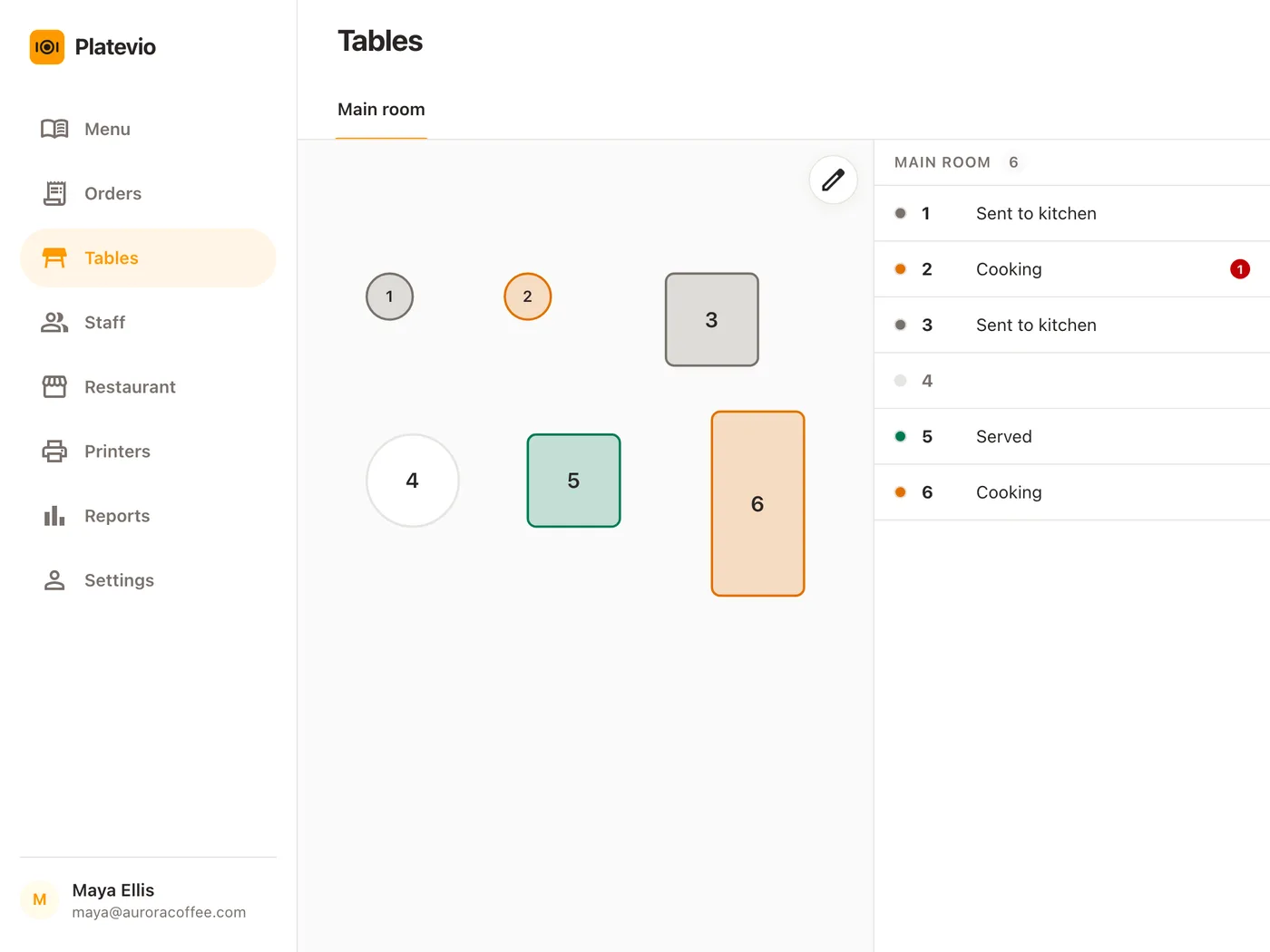
Rooms, then round, square and long tables at their own size and angle — and in service every table says where it stands: Sent to kitchen, Cooking, Ready to serve, Served, Paid, with the plates waiting at the pass counted beside it. A table management system inside your POS, on the phones and tablets you already own, and free: nothing per table, per screen or per user.
No card needed. Runs in the browser or the app.
What restaurant table management software is
Restaurant table management software — a table management system, a table map, the floor plan in your POS, one idea under several names — is the dining room drawn on a screen, with each table showing what is happening at it. It answers the two questions a floor asks all night: which table is that, and does it need me. The second is where the category divides: at its best a table management system is part of the point of sale, so a table’s state comes from the order on it rather than from somebody updating a chart.
-
The room
Rooms and tables drawn where they stand, in their shapes and sizes, so the screen matches the floor.
-
The state
Each table’s stage of the meal, from order sent to check paid, readable down one column.
-
The pass
What is ready and waiting to be carried, counted per table.
-
The order behind it
A tap on a table opens its check, or starts one with the table already set.
A chart somebody keeps, or a map the kitchen keeps
A whiteboard by the door and a good memory work until the room is full. Then every change needs someone with a minute, and the board is only as current as its last update. Platevio’s map is kept by the people already doing the work.
-
Current without anyone updating it
The kitchen marking a plate ready is what moves the table, so the map is right because the food is.
-
The pass is on the floor
Plates waiting to be carried are counted on the table’s own row, where the waiter is already looking.
-
Everyone reads the same floor
Every phone and tablet draws one map, and a new room or a renamed table reaches all of them at once.
One table’s evening, on the floor
A Friday. Table 4 in the main room, from before service to the moment it is free again.
-
17:30
The terrace goes on the map
The manager adds a Terrace room, drops in four round tables, turns the long one to 45° and saves once. Every phone on the floor has the new room.
-
19:02
Table 4 is taken
It is free, so a tap on it opens a new order with table 4 already set. Two starters, two mains, sent.
-
19:03
The floor says it
Table 4 turns grey and its row reads Sent to kitchen on every device, with nobody having touched a screen.
-
19:14
Starters up
The row reads Cooking, because the mains are still in the pan, and beside it a red 2: two plates waiting at the pass, read from across the room.
-
19:40
Everything is out
Every dish is at the table and the row reads Served, in green. Nothing at table 4 needs anyone.
-
20:25
Paid, and free again
The check is settled and the row reads Paid, in blue. One tap hides the check, and table 4’s row is clear for the next party.
What Platevio’s table map does
Seven things, each of them on the screen today.
-
Your room, drawn the way it is
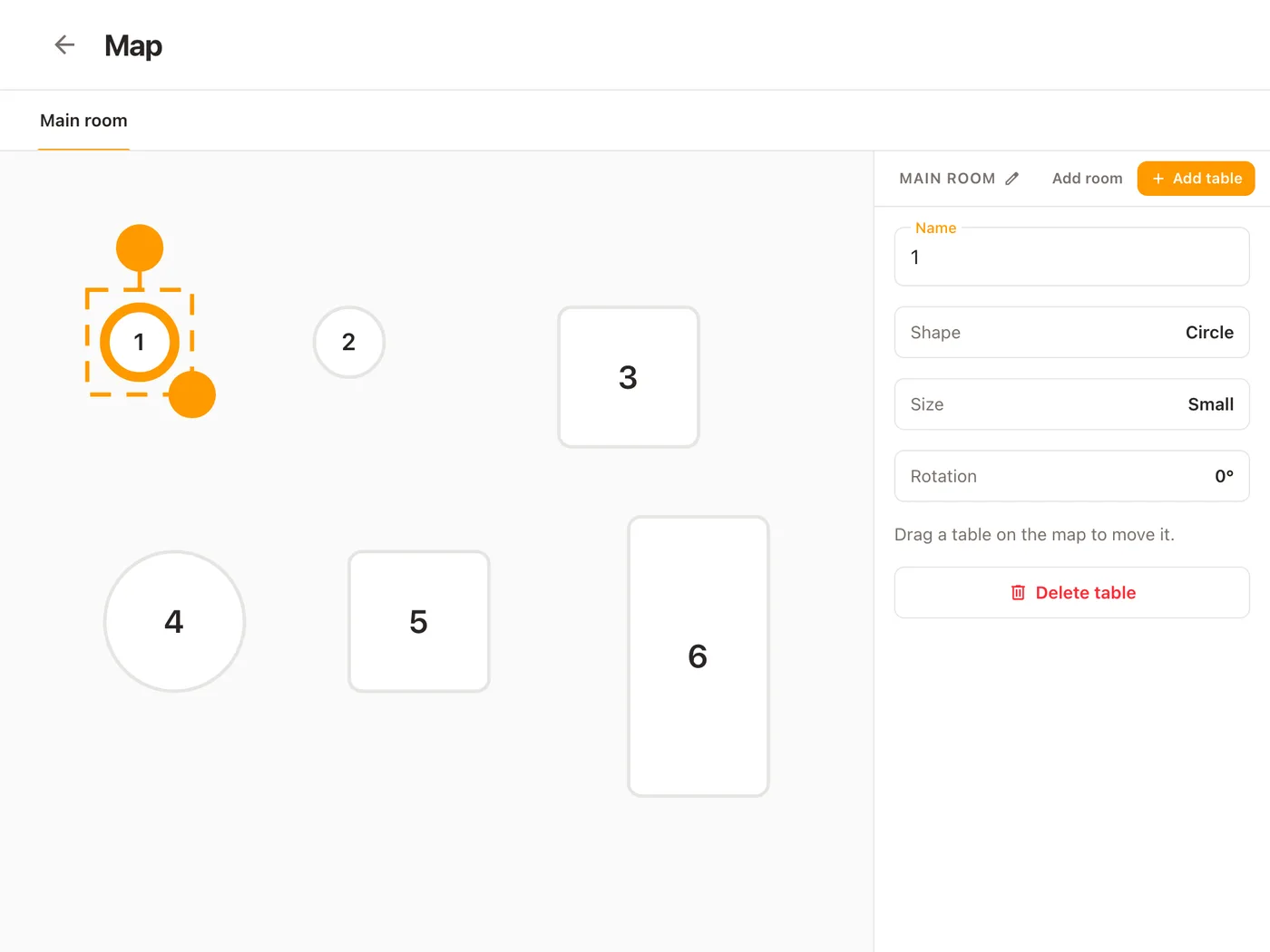
Rooms as tabs above the floor. Round, square and rectangular tables in three sizes, turned square to the wall or on the diagonal, dragged into place with a finger. The name sits inside each table.
-
Every busy table says its state in words
Sent to kitchen, Cooking, Ready to serve, Served, Paid — written on the table’s row and drawn on the floor in the colours the kitchen’s order cards use. A column of words, not a legend.
-
The plates waiting at the pass, counted
A red number on the table’s row says how many dishes are up and ready to carry while the rest of the table is still cooking: one plate up and two in the pan reads Cooking with a red 1.
-
Nobody sets it by hand
The least advanced dish on the check decides the state, so a table reads Ready to serve only when everything on it is up.
-
Live on every device
An order sent, a dish marked, a map saved: each one reaches every phone, tablet and laptop without a reload.
-
Tap a table to work it
A free table starts its order with the table already set. A busy one opens its check. A check can move to another table from its own page, and the picker shows which tables are taken.
-
Rename a table and every check follows
The order, the Orders board, the bill and the next kitchen ticket all read the new name, because an order points at the table rather than copying it. Tickets carry it to the printer over WiFi, Ethernet, USB or Bluetooth.
Draw the room in minutes, on the device in your hand
Every new restaurant opens with a main room of six tables already on the floor, so you reshape a room rather than start from a blank grid. Select a table and its panel reads its name, shape, size and rotation, each one tap to change; the handles on the table do the same on the floor. Add table lands a new one clear of the rest, numbered after the last, and Add room opens a terrace or a bar as its own tab. Save once and the whole floor changes on every device; leave with something unsaved and it asks first. Owners, administrators and managers get the pencil.
How to choose restaurant table management software
A table map demos well on one screen, and a floor runs on five. The best restaurant table management software is the one your waiters can read from across the room, on the second device as cheaply as the first.
- Can the map be drawn like your room — shapes, sizes, angles, more than one room?
- Does a table’s state come from the kitchen, or from somebody tapping it?
- Can a waiter see from the floor how many plates are waiting at the pass?
- Does it run on the phones and tablets your staff already carry?
- Is it priced per location, per device or per user, and what does the second tablet cost?
Table management questions
- What is a table management system?
- Software that draws the dining room and shows what is happening at each table: free, order sent, cooking, ready, served, paid. Inside a point of sale it is fed by the orders themselves, so the floor stays current on its own.
- Is there free restaurant table management software?
- Yes. Platevio’s table map is free, with no fee per table, per screen, per handheld or per user, and no trial that runs out.
- How much does table management software cost?
- Stand-alone table management tools commonly list about $130–$500 per location per month, and most of the market puts the floor plan in a paid tier. Platevio charges nothing for the map and nothing per device.
- Can I draw my own floor plan?
- Yes. Add rooms, then round, square or rectangular tables in three sizes, turned square or at 45°, and drag each into place. Save once, and every device has the new room.
- Does it work on phones and tablets?
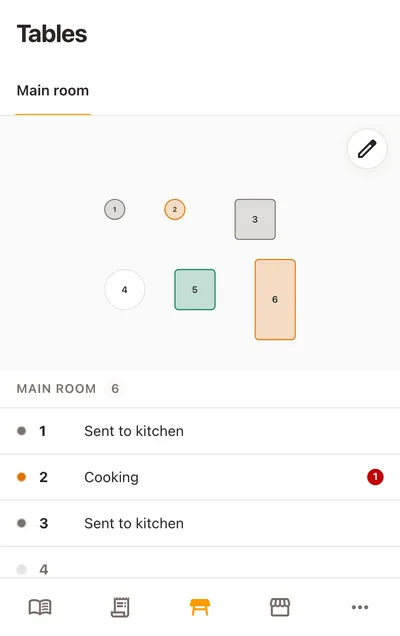
- Yes, in the browser or the app. On a phone the floor sits above the list of tables; on a tablet or laptop the list stands beside it.
- What do the table colours mean?
- Grey is sent to the kitchen, amber is cooking, red is ready to serve, green is served and blue is paid. The list beside the floor says each one in words.
- Do I have to put every order on a table?
- No. Orders work without one, so a counter sells with no table set and a café attaches a table only when guests sit down.
Open your restaurant tonight
It takes a minute: your restaurant, your first menu, and you are taking orders.