Free. No card, no plan.
The restaurant order taking app that runs on your waiters’ own phones
A waiter app for the floor: take the order at the table with every extra, note and course, and the kitchen, the bar and every other phone have it the moment it is sent. Free — no fee per device, per handheld or per waiter, and no hardware to buy.
No card needed. Runs in the browser or the app.
What a restaurant order taking app is
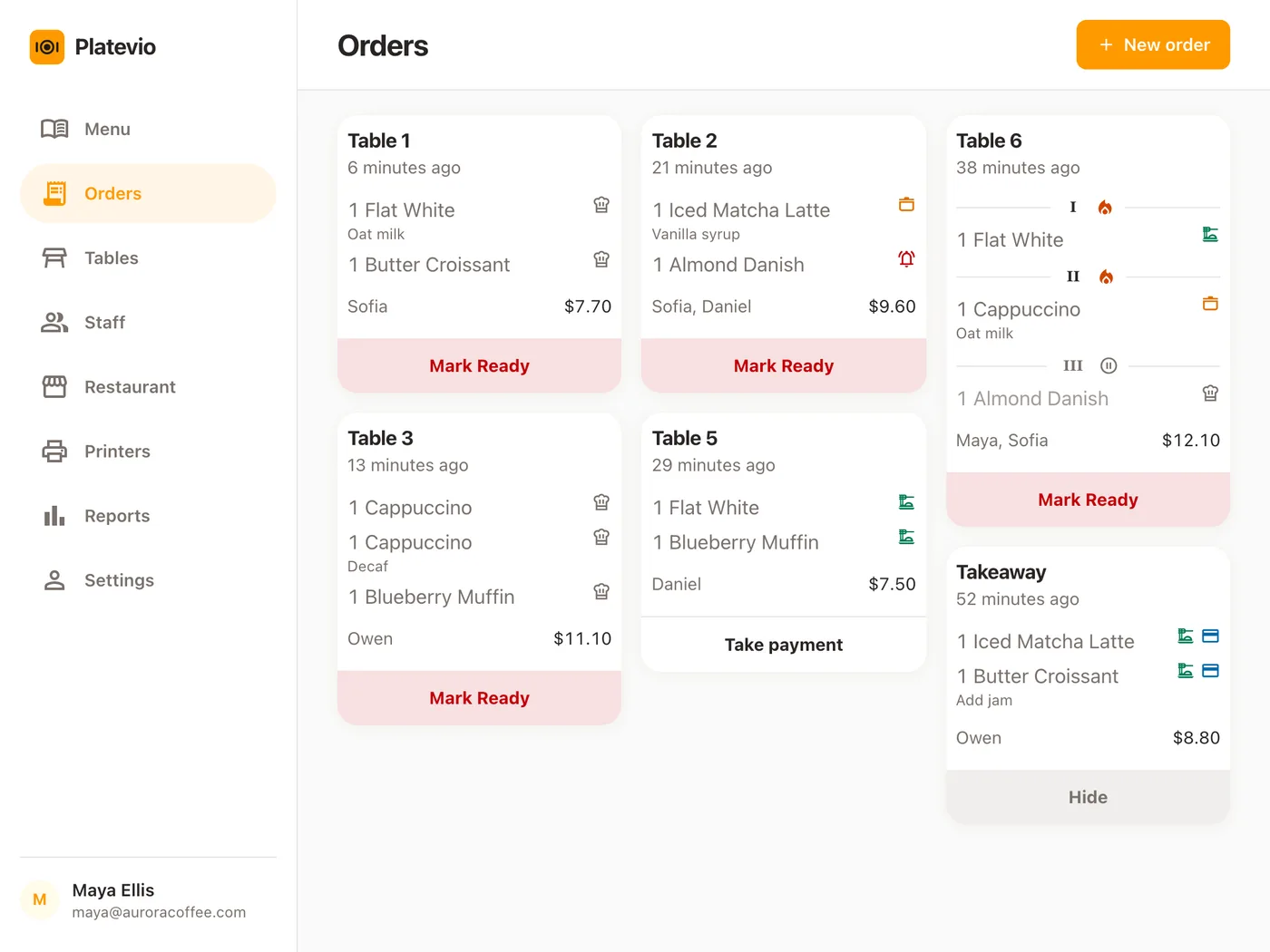
An order taking app is what a waiter — a server, in the US — uses in place of the pad: the order goes into a phone at the table and travels to the kitchen, the bar and the till, so nobody re-types it. The trade also says waiter app or tableside ordering. What varies is the hardware it needs and what it costs per device.
-
The order
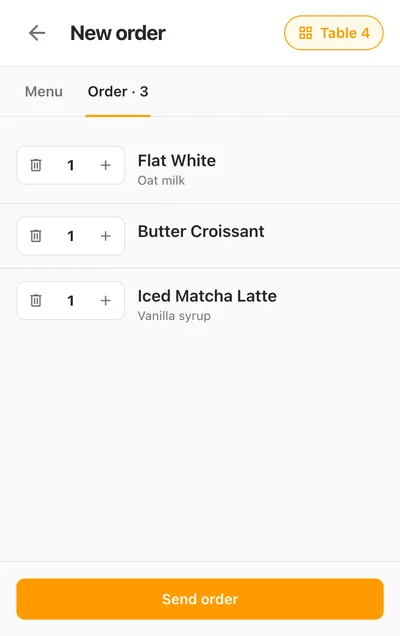
Each dish with its extras, a note for anything unusual, and its course.
-
The send
One tap puts it in front of the kitchen, the bar and every other screen — and on paper where a printer is set up.
-
The pass
The kitchen’s progress comes back to the floor dish by dish.
-
The check
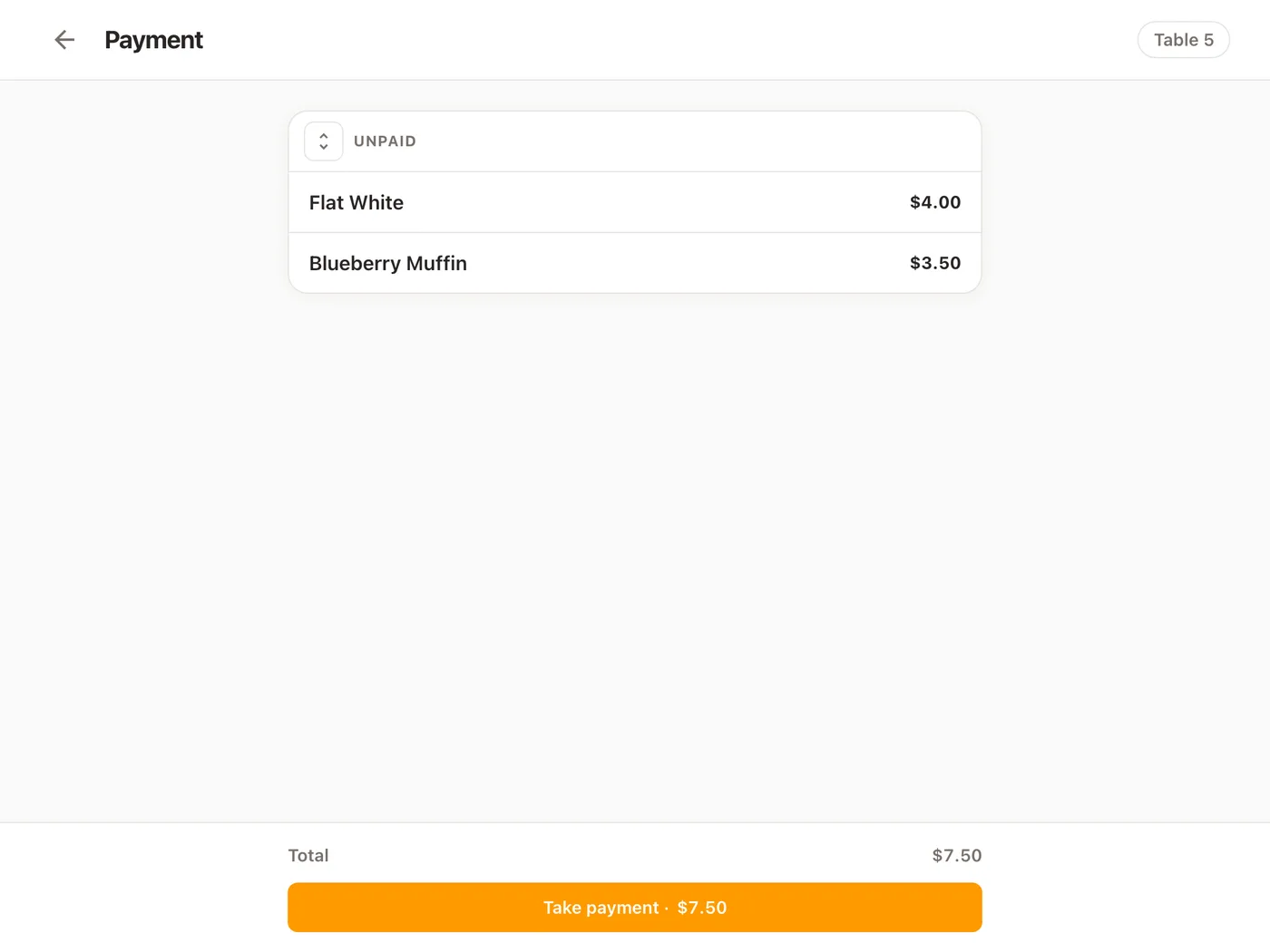
What was served becomes the bill, paid whole or split by dish.
A proprietary handheld, or the phone in the waiter’s pocket
Most of the market sells a handheld POS system for restaurants as a device with a licence to match. A phone already puts the order in the waiter’s hand — charged, familiar, theirs — so Platevio makes it the handheld.
-
One per waiter, not a pool
Every server has their own device from the first table; nobody waits for the shared handheld.
-
Nothing to buy, dock or replace
No device to order, no cradle by the till, nothing to replace when one goes into a sink.
-
A new server starts tonight
Invite them by email and they sign in on their own phone, with their own login and role.
-
The same screens as everybody else
The board, the floor plan and the check — not a cut-down view.
One table, from the order to the check
A Saturday, a table of four, one server with a phone in her apron.
-
19:02
The table is opened from the floor
She taps table 12 on the floor plan on her phone. A new order opens already set to that table, the menu under it.
-
19:05
The order goes in, course by course
Drinks and starters in the first course, the mains in a second she holds back. No onions is an extra on its dish, “nut allergy” a note on a main. One tap sends it.
-
19:05
Everyone has it
The kitchen board, the bar and every other phone show the check, nobody having touched a screen. The kitchen ticket prints the food, the bar ticket the drinks. The mains wait, held.
-
19:14
The starters are up
The chef marks them ready. On her phone table 12 reads Ready to serve, with a count of plates at the pass. She runs them and taps Mark Served.
-
19:31
The mains go
With every starter served, the card offers to fire the second course. One tap and the kitchen starts the mains; nothing fires on its own.
-
19:48
Another round
Two more drinks and a dessert go onto the same check. Only the new dishes print.
-
20:12
The check
Everything served, the card reads Take payment. Two dishes go on a card, the rest in cash, the change on screen. One tap hides the check, and table 12 is free again on every screen.
What Platevio’s order taking does
Eight things, every one of them on the screen today.
-
Your own phone is the handheld
Any phone, tablet or laptop, in the browser or the app. A new order is a tap on the board or on a vacant table.
-
Extras and notes on the dish they belong to
Extras chosen per dish, several at once, and a free-text note for anything unusual. Both stay on that dish on the board and on the ticket.
-
Courses, held and fired in turn
Up to three courses on any check, no setting to switch on. A later course is held until the floor fires it.
-
Every device has it the moment it is sent
The kitchen board, the floor plan and every other phone update on their own, nobody touching a screen.
-
The ticket prints itself
The ticket prints the moment the order is sent, with the table, the waiter’s name, extras, notes and courses — food to the kitchen, drinks to the bar. WiFi, Ethernet, USB and Bluetooth; ESC/POS and Star Micronics.
-
What is waiting at the pass
Every dish carries its own status — ordered, being made, ready, served. The floor plan says Ready to serve and counts the plates up.
-
The check, split by dish
Pay the whole check in one go, or tap a dish to split it — down to one of three identical drinks — each part with its own method.
-
A login for every person, a name on every order
Staff are invited by email and sign in with a role — Waiter, Cook, Bartender, Cashier, Manager. The card and the ticket say who took the order.
The check is the order — split it by dish at the table
The bill is what the kitchen marked served: nothing is re-keyed and nothing still on the pass is charged. It opens as one check and one amount, because most tables pay together. To split, tap a dish — three drinks become three lines, one per guest — and the amount on the button follows what is ticked. Each part is paid by cash, card, cheque, meal voucher or a method the restaurant named; under cash, the change is on screen. Paid lines move to their own card, marked with how they were settled.
What a handheld usually costs
Handheld order taking is two bills: the device, bought per waiter, and the software, charged per device per month on top of the point of sale. A second handheld is the same money again.
| Typical handheld | Platevio | |
|---|---|---|
| The handheld itself | $399–$494 each | The phone your server already carries |
| Software, per extra device, per month | About $50 | $0 |
| The point of sale underneath it | A plan per location, from about $69 a month | $0 |
| Each extra login | Often a paid seat | $0 — unlimited staff |
Going rates are published vendor pricing read in September 2026. Platevio charges nothing — not per device, not per user.
How to choose a restaurant order taking app
Ask these of any waiter app about your busiest night, not the demo.
- Does it run on the phones your staff already carry?
- Is each extra device billed every month, and each login a paid seat?
- Do extras, notes and courses reach the kitchen ticket on the dish they belong to?
- Does the waiter’s phone show when the food is up?
- Can the table split the check by dish?
Order taking questions
- What is a restaurant order taking app?
- The app a waiter takes the order on at the table, in place of a pad, so it goes straight to the kitchen and the till. Platevio’s runs in the browser on your staff’s own phones.
- What do waiters use to take orders?
- A pad, a proprietary handheld, or their own phone. With Platevio it is the phone, which also shows what is ready at the pass.
- What is the best free app for taking orders at a restaurant?
- One that runs on phones you already own and charges nothing per device or per user. Platevio is free — every feature, unlimited staff and orders, no card to enter.
- Can I use my phone as a POS?
- Yes. Platevio runs in the browser on any phone, tablet or laptop, Android and iPhone alike: a server’s phone takes the order, prints the ticket and settles the check.
- How much does a handheld POS cost?
- Commonly $399 to $494 a device, plus a monthly fee per device. With Platevio the handheld is a phone you already own, with no per-device fee.
- Can you split the check by item?
- Yes. Tap a dish on the check and it splits, down to one of three identical drinks, and each part is paid with its own method — cash, card, cheque or meal voucher.
Open your restaurant tonight
It takes a minute: your restaurant, your first menu, and you are taking orders.