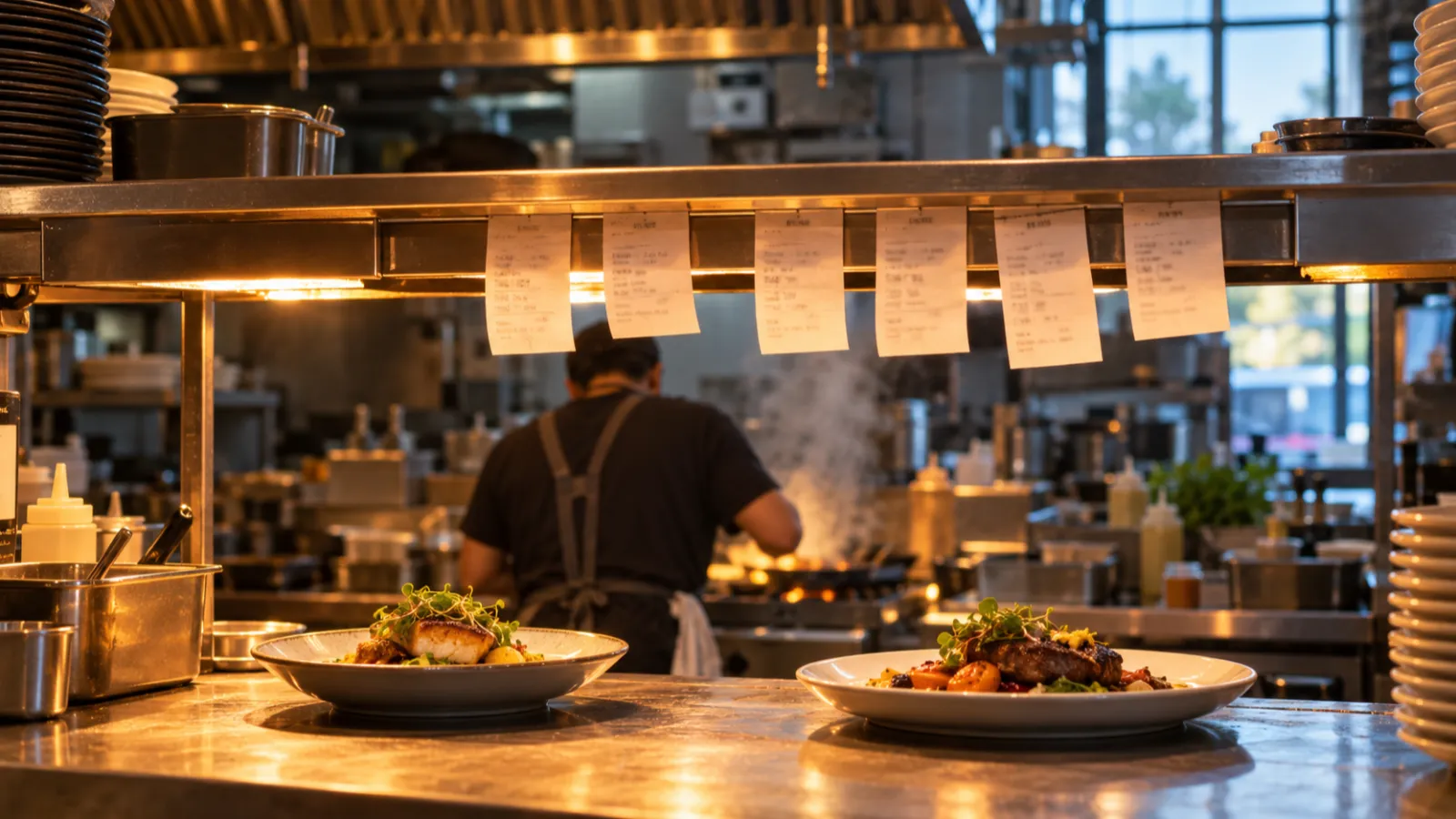
A kitchen order ticket is the cook’s copy of an order. It tells the kitchen what to make, how to make it, who it is for and when to start, and nothing else. No prices, no tax, no payment. Most kitchens just call it a ticket; you will also hear chit, check (in the UK) or docket (in Australia), and in some hotel kitchens KOT.
A good ticket can be read in two seconds by someone holding a pan. It puts the table or name and the time at the top, one item per line with the quantity first, the changes indented underneath, and any allergy where nobody can miss it.
How the ticket reaches the kitchen is a separate choice: a handwritten pad, a kitchen printer, or a screen on the wall. Each works. Each fails in its own way. This guide covers the ticket first, then the choice.
What a kitchen order ticket is, and what it is not
The ticket is an instruction, not a record of money. That one distinction explains most of what belongs on it.
- The guest check (US) or bill (UK, Australia) is the guest’s copy. It lists prices, tax, discounts and the total, and it is what gets paid.
- The receipt is proof of payment, printed after the money moves.
- The kitchen ticket goes the other way, from the floor to the line. It carries the order and the instructions to cook it, and it is thrown away once the plates are up.
The words change by market but the object does not. In US kitchens a chit is line slang for the ticket that prints on the cook’s line, and the metal strip over the pass that holds tickets is the rail (WebstaurantStore’s kitchen slang glossary). UK catering suppliers sell “tab grabbers” that hold checks. Australian kitchens say docket: docket rail, docket spike, docket printer. KOT, short for kitchen order ticket, is common in South Asian and hotel-school usage and rare on a US, UK or Australian line.
Who reads it
The cook reads their items. The expeditor (or the chef running the pass) reads the whole ticket to know when a table is complete. The bartender reads the drinks. A runner reads the table and seat numbers. A ticket written only for the cook leaves the others guessing.
What goes on a kitchen ticket
Every field below earns its place by answering a question someone in the kitchen would otherwise have to shout across the room.
| Field | Why the kitchen needs it |
|---|---|
| Order type (dine-in, takeaway, delivery) | Plates or boxes; whether the food waits for a table or a driver |
| Table number, or a name or order number | Where the food goes; what to call out at the pass |
| Number of guests | Whether a table’s order looks complete |
| Server name | Who to ask when something is unclear |
| Time sent | Which ticket is oldest; how long the table has waited |
| Course or “fire” status | Whether to start now or hold |
| Quantity and item | What to make |
| Modifiers (changes from the standard dish) | How to make it differently |
| Seat number | Which plate goes to which guest |
| Allergy flag | What must not touch the plate |
| Free-text note | Anything the modifiers cannot say |
| Add-on, void or reprint marker | Whether this is new food, a cancellation or a copy |
What to leave off
Prices, tax, discounts and payment details have no use in the kitchen, and every extra line pushes the important ones down. On a takeaway, a first name is enough.
How to lay out a ticket the line can read
A cook glances at a ticket mid-task, so the layout should answer questions in the order they are asked: whose is this, how old is it, what do I make, and how is it different.
Here is an example ticket for a dine-in table, as a thermal kitchen printer prints it (invented names and times):
Table                         12
Date                  10/29/2026
Time                     7:42 PM
Waiter                Maya Lopez
--------------------------------
             Mains

2 Cheeseburger
  + Medium rare
  + No onion
1 Pad thai
  * PEANUT ALLERGY - no garnish
1 Fish and chips
  + Side salad
* Sauce on the side| Line | What it shows | Why it sits there |
|---|---|---|
| Table | Where the food goes: a table number, or the order type and a name for takeaway | The first thing anyone at the pass looks for |
| Date and time | When the dishes were sent, not when the table sat down | Ticket order on the rail, and how long it has waited |
| Waiter | Who took the order | Who to ask when something is unclear |
| Rule | Separates the head from the dishes | The eye jumps straight to what to cook |
| Course heading | Which course these dishes belong to | Tells the cook what goes out together |
| Quantity and item | How many, of what, one dish per line | The cook scans down a column of numbers and names |
+ lines | Modifiers, indented under their dish | A change belongs to one dish, not the order |
* lines | A free-text note, last, under its dish | Allergies and anything the menu cannot express, written in capitals when it matters |
A few layout rules hold whether the ticket is printed, handwritten or on a screen:
- One item per line. “2 burgers, 1 pad thai” on one line is how items get skipped.
- Group the same dish. Two identical burgers are “2 CHEESEBURGER”, not two lines. Two burgers with different changes are two lines.
- Use the menu’s own short names. If the menu says “Smash burger”, the ticket should not say “Burger, double”. Cooks learn the ticket words, not the menu words.
- Agree the abbreviations. On paper, “NO ONI” and “S/S” (sauce on side) are fine if everyone reads them the same way. Write the list on the wall by the pass.
Modifiers, notes and allergies
Modifiers beat free text
A modifier is a structured change chosen from a list: no onion, add bacon, oat milk, medium rare. It prints in the same place, in the same words, every time, and the cook learns to read it without thinking. Free text (“can he get it a bit crispy and maybe no sauce?”) is different every time, so it is the line most often missed on a busy night.
Build the common changes as modifiers and keep notes for the truly unusual. If the same note appears three times in a week, make it a modifier.
Allergies need their own routine
An allergy is not a preference, and it should never travel as an ordinary note. The rules on telling guests about allergens differ by country, and this section is general information, not legal advice; your local food authority is the place to check what applies to you.
- US: the FDA Food Code, a model code that states and localities adopt, names nine major food allergens, sesame among them since 2023, and calls for written notice to guests of major allergens in unpackaged food (FDA).
- UK: businesses must give allergen information on all non-prepacked food for 14 named allergens and train staff on allergens (FSA guidance on GOV.UK).
- Australia: the National Allergy Council’s model policy for food service says front-of-house staff record a guest’s allergy accurately on the order and confirm it verbally with the people preparing the food, and that allergy meals go out on their own (All about Allergens).
That Australian wording makes a good routine anywhere:
- Ask every table about allergies, and ask which dishes it applies to.
- Record it on the ticket as an allergy, not a note: a banner at the top and a flag on the item.
- Say it at the pass as well. The ticket is the written half; the conversation is the other.
- Confirm that the kitchen can do it. If a fryer is shared or a sauce comes in made, the guest needs to hear that before the food is cooked.
- Run it separately. The plate goes to the table on its own, by someone who knows why.
Courses, firing and ticket times
In a coursed restaurant, the ticket for a table’s mains often arrives with the starters, so the kitchen can see the whole table but should not start the mains yet. That is what “hold” and “fire” mean. The mains sit on hold until the server sends a fire for that course, and only then do the cooks start.
On paper, firing is a second, short ticket (“FIRE MAINS · TABLE 12 · 7:58”) or a call at the pass. On a screen, held items usually show apart and join the queue when fired. Either way, the course and its status belong near the top of the ticket.
Ticket times
A ticket time is how long a ticket has been open, from sent to plates leaving the pass. There is no universal target: a café toastie and a 45-minute braise should not share one.
To measure it on paper, the time sent must be on the ticket and someone at the pass writes the time the plates leave on it, then the tickets go in a box at the end of service. A week of tickets shows which dishes and which hours run slow. A kitchen screen usually counts the time for you and changes colour as a ticket ages, which is one of its strongest arguments.
Routing tickets to stations
Once a kitchen has more than one station, the grill cook should not have to read past four cocktails and a dessert to find two steaks.
Routing means each station gets only its own items:
- Kitchen or grill: hot food.
- Cold or pastry station: salads, starters, desserts, if a different person makes them.
- Bar: drinks, so they are poured while the food cooks rather than after.
- Expo or pass: the whole order, so one person can check that a table is complete before it goes.
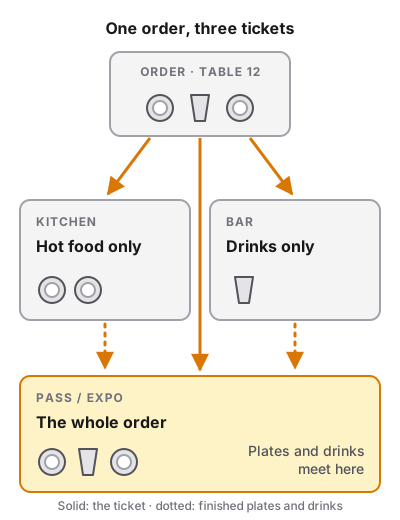
On paper, routing is a carbon-copy pad: the server tears off the top copy for the kitchen and the second for the bar, or writes the drinks on a separate slip. With a printer, each item is assigned a destination when the menu is built, and each printer gets only its items. With screens, each station’s screen shows only its items, while an expo screen shows everything.
Changes after the order is sent
This is where most ticket systems leak: a server calls a change across the pass, and the cook who heard it goes on break. The rule is that every change becomes a ticket.
- Add-on: new items for an open table print or show as a new ticket, marked as an addition, so the kitchen does not cook the whole order again.
- Void: a cancelled item prints or shows as a cancellation, clearly marked, so the station stops cooking it.
- Reprint: a copy is marked as a copy. Two identical tickets on the rail look like two orders.
Paper pad, kitchen printer or kitchen screen
Plenty of kitchens use two of these at once.
| Handwritten pad | Kitchen printer | Kitchen screen | |
|---|---|---|---|
| How the ticket arrives | Server carries it | Prints when the order is sent | Appears when the order is sent |
| Legibility | Depends on the handwriting | Same font every time | Same layout every time, sizeable |
| Changes and voids | Cross out, rewrite, walk over | New ticket prints | Ticket updates in place |
| Order of tickets | By hand on the rail | By hand on the rail | Sorted automatically by time |
| Ticket times | Written by hand, if at all | Time printed; end time by hand | Usually counted for you |
| Coursing and fire | Second slip or verbal | Fire ticket prints | Held items shown apart |
| Heat and grease | Paper smudges | Thermal paper darkens with heat; impact copes better | Screen needs a mount away from heat and splashes |
| Running cost | Pads | Paper rolls (plus ribbons for impact) | Software fee, if any |
| Needs the network | No | Yes, from POS to printer | Yes |
Thermal or impact printers
A thermal printer burns the text onto heat-sensitive paper. It is quiet, fast and has no ribbon, which makes it the usual choice for receipts. The catch in a kitchen is the same property that makes it work: heat. A thermal ticket left on a shelf above the grill or salamander can darken until it is hard to read.
An impact printer (dot-matrix) strikes an inked ribbon onto plain paper, often two-ply so one copy stays on the rail and one goes to expo. It is slower and louder, but the ticket does not react to heat, which is why impact printers are a traditional choice right next to the line. A thermal printer works fine at a bar, a cold station or a pass that is a few steps from the heat.
In a loud kitchen a new ticket is easy to miss, so kitchen printers are often paired with a buzzer, and screens with a sound and a colour change.
Both need the network
A common claim is that printed tickets keep working when the network goes down. That is only true of a pad. A kitchen printer fed by a POS still needs the POS to reach it, over WiFi, a cable or Bluetooth. If the order cannot get from the tablet to the printer, nothing prints. Whatever you choose, keep a pad and a pen at the pass, and agree beforehand what happens when the system stops.
What each setup costs
These are US figures as of 2026, to show the order of magnitude. Prices move, and your market’s dealers will quote in their own currency.
| Item | Example US price (as of 2026) | Source |
|---|---|---|
| Duplicate order pads | A few dollars a book | Any restaurant supplier |
| 80 mm thermal receipt and kitchen printer | About $300 | WebstaurantStore listing |
| Impact kitchen printer | About $350 | WebstaurantStore listing |
| Tablet used as a kitchen screen, with mount | $0–300 | Typical range |
| Commercial heat-rated display | $400–800 | Typical range |
| Proprietary kitchen display hardware | $799–1,500 | Typical range |
| Kitchen display software | $20–30 per screen per month at one major POS, on top of a paid plan | Published POS pricing |
The screen software fee is often the largest cost over time: $30 a month for two screens is $720 a year, every year. Some POS systems include the kitchen screen at no extra charge, so ask. A printer’s running cost is paper, plus ribbons for an impact printer.
A tablet you already own is the cheapest screen, as long as it is mounted out of the splash zone and kept on a charger. If you are pricing a whole fit-out, the commercial kitchen equipment list puts these items in a full budget.
Which one fits your place
- Coffee counter or small café. One person takes the order and often makes it. A pad, or one thermal printer or tablet at the machine, is enough. What matters most is that milk and size changes are modifiers, not scribbles.
- Food truck. Space and heat are the constraints. A tablet screen on a mount, or a small printer kept away from the flat-top, with the order number in large type for calling out.
- Bar with a short food menu. Drinks stay at the bar; food goes to the kitchen on a printer or screen. Routing is the whole point here.
- Restaurant with one hot line. A kitchen printer by the pass (impact if it sits in the heat) or a single screen. Add a fire step if you serve courses.
- Several stations. Screens per station plus an expo view earn their keep here, because they sort tickets, count ticket times and update in place. Many kitchens keep one printer as a backup or for the bar.
If you are still choosing the system that sends the orders, start with what a POS system is and how it works. If the kitchen is not built yet, decide where the pass and the screens or printers go when you draw the restaurant floor plan, not after.
Ticket checklist
Run through it with the team before a new menu or system goes live.
- Order type, table or name, and covers are the largest text on the ticket
- One item per line, quantity first, menu short names
- Common changes are modifiers, indented under their item
- Allergies appear as a banner and on the item, never only as a note
- Allergies are also said at the pass, and allergy plates run separately
- Courses show hold or fire status near the top
- Each station gets only its own items; expo gets everything
- Add-ons, voids and reprints are clearly marked as such
- Thermal printers and screens sit away from direct heat and splashes
- A pad and pen are at the pass for when the network or POS is down
- Tickets or timers are reviewed after service to find slow dishes