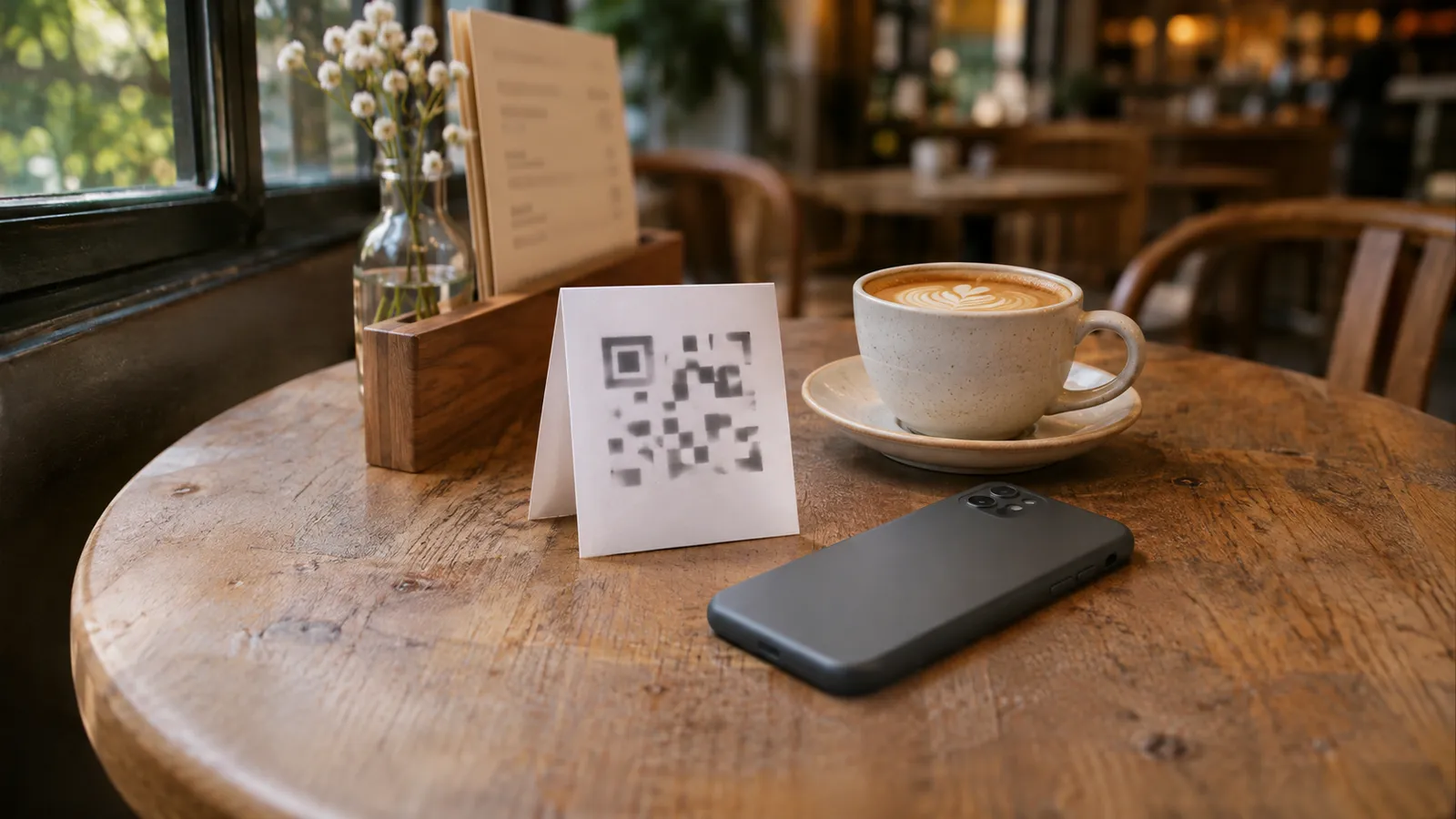
A QR menu is a printed code that opens your menu on the guest’s own phone. They point the camera at it, a web page opens, and they read the menu there instead of waiting for someone to bring one. That is all it has to be. Ordering and paying by QR are separate tools that often get sold under the same name.
Three decisions make or break one: where the codes go, how big they are printed, and what the code points at. Get those right and a QR menu costs very little, often only paper and a few stands. Get them wrong and you pay a monthly fee for a code that stops working, or a sticker nobody can scan from their chair.
It will not replace your paper menus, and it will not take orders for you. What it can do is put the menu in front of a guest the moment they sit down, and keep the prices they read the same as the prices you charge.
What a QR menu is, and what it is not
The phrase covers three different things, and sales pages often blur them, because the second and third cost the most.
| What the guest does | What the venue needs | |
|---|---|---|
| QR menu (view only) | Scans, reads the menu, orders from staff as usual | A web page with the menu and a printed code |
| QR ordering | Scans, picks dishes, sends the order to the kitchen | Ordering software linked to the kitchen, often per-table codes |
| QR pay at table | Scans the bill, pays on the phone | A payment provider and a fee on every payment |
This guide is about the first one. If a sales page says “QR menu” and quotes a monthly price, check which of the three you are being sold.
Static and dynamic codes
The code itself is just an address turned into a pattern. There are two kinds:
- A static code has the address written into the pattern. It is free to make, it never expires, and it cannot be changed after printing. If the page at that address moves, the code is dead.
- A dynamic code points at a short link owned by the QR company, which forwards the guest to your menu. You can change where it goes without reprinting, but it only works while that company keeps forwarding, which usually means while you keep paying.
PDF or web page
What the code opens matters as much as the code. A PDF of your printed menu is the quickest to set up and the worst to read: guests pinch and zoom on a phone, and every price change means a new file. A web page built for a phone scrolls, loads fast and can be changed in one place. If your menu changes more than twice a year, point the code at a web page.
Do guests actually want them?
Most would rather not. In US Foods’ 2024 Diner Dispatch survey of more than 1,005 US diners, conducted in April 2024, 90% said they prefer print menus over QR codes, up from 74% in 2023, and the shift held for Gen Z as well as baby boomers (US Foods, October 2024).
That measures preference, not whether guests will scan at all. What it tells you is how to use a QR menu:
- As an extra, not a replacement. Keep paper menus and offer the code beside them. Nobody should have to use a phone to see what you sell.
- Where waiting is the problem. The door, the queue, the patio where a server takes a while to arrive. A guest who can read the menu while they wait is a guest who is ready to order.
- For what paper does badly. Photos of dishes, a long drinks list, today’s specials, a menu in a language your printed menu is not in.
A café, a bar or a food truck with a queue gets the most from one.
Where to put the codes
Put a code anywhere a guest is waiting for a menu, or deciding whether to come in.
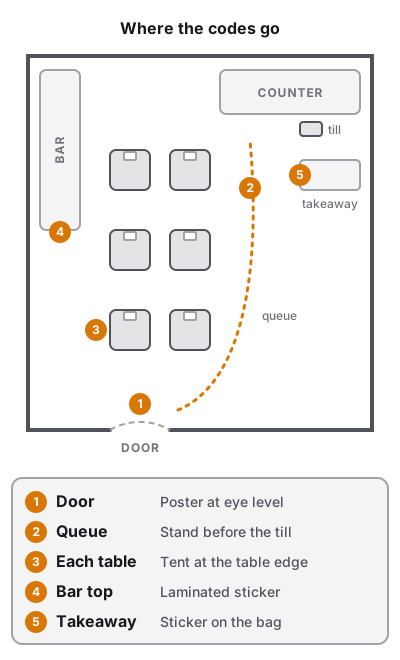
| Spot | Who scans it | What to print | Tip |
|---|---|---|---|
| Table | Seated guests | Table tent, stand or sticker | One per table; at the edge, not under the salt |
| Front door or window | Passers-by deciding | Poster at eye level | Readable from the pavement, out of the sun’s glare |
| Queue or counter | Guests waiting to order | Poster or counter stand | Before the till, not at it, so they choose while they wait |
| Bar top | Drinkers | Sticker or small stand | Away from the drip trays; laminate it |
| Takeaway bags and boxes | Next week’s order | Sticker | The menu travels home with the food |
| Online | People planning a visit | The link, not the code | Google Business profile, Instagram bio, messaging replies |
A few placement rules hold everywhere:
- Say what it is. “Scan for the menu” beside the code. A bare code could be anything, and guests have learned to be wary of them.
- Print the short address under it. Someone whose camera will not focus can still type it.
- Keep it flat and lit. Codes on curved cups, glossy laminate under a spotlight or a dark corner of a booth are the ones that fail.
- One code per table is enough for a view-only menu. Per-table codes only matter when the code has to tell an ordering system which table sent the order.
If you are planning a new room, mark where the stands go when you draw the restaurant floor plan, next to the door, the queue line and the counter.
How big to print the code
There is no official size for a menu code. How far away a code reads depends on the phone, the light and how much the code holds, so the only size that counts is the one that scans from the seat. A workable place to start is a code about a tenth as wide as the distance it is read from, then print one and test it. An old phone, dim light or a guest who will not lean in all argue for bigger.
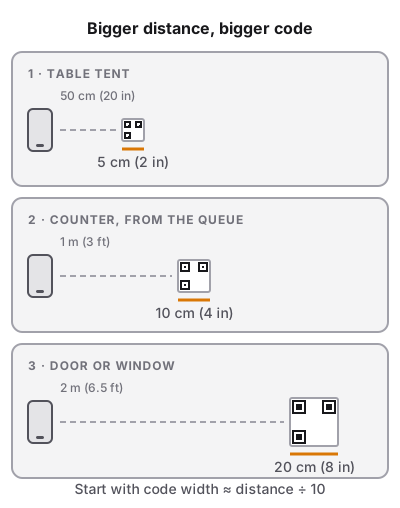
| Where it goes | Typical scan distance | Size to test first |
|---|---|---|
| Takeaway sticker | 15–20 cm (6–8 in) | 3 cm (1.2 in) |
| Table tent or stand | 30–50 cm (12–20 in) | 5 cm (2 in) |
| Counter, from the queue | 1 m (3 ft) | 10–12 cm (4–5 in) |
| Door or window | 1.5–2 m (5–6.5 ft) | 20 cm (8 in) or more |
If the test print does not scan easily from the seat, go up a size; do not go smaller than the test that worked.
What makes a code fail
- No margin. A code needs a clear border around it, the “quiet zone”. GS1, the barcode standards body, sets it at four times the width of one of the code’s small squares on every side (GS1 New Zealand). Designers crop it to make the code fit a layout, and the code stops reading.
- Low contrast. Dark code on a light background. A pale code, a reversed (light-on-dark) code or one printed over a photo will defeat some phones.
- A long address. A longer address makes a denser pattern of smaller squares, which needs a bigger print. Keep the address short, or use a short link you control.
- Gloss and curves. Matte stickers and flat surfaces scan best. Laminate with matte film if the code lives on a wet bar.
Test before you print a hundred
Print one at the real size, put it where it will live, and scan it from the guest’s seat with two or three different phones, including an older one, in the evening light. Then print the rest.
What a QR menu costs
A view-only QR menu can cost next to nothing, or a monthly subscription for years. The difference is almost always in two lines: the code and the page behind it.
| Part | What it costs |
|---|---|
| A static QR code | Usually free to make |
| A dynamic QR code | Usually a monthly or yearly plan with the QR company, often with a cap on codes or scans |
| Menu web page | Free to a monthly fee, depending on the menu app or POS |
| Acrylic table tent, 4 × 6 in | About $3.89 each at a restaurant supply store (WebstaurantStore) |
| Stickers, card, posters | Paper and ink if you print them yourself |
The trial trap
The cost that catches owners is not on the price list. If a generator’s free trial gave you a dynamic code, that code depends on the account, and it can be paused when the trial or the plan ends. A static code has no account behind it. A dynamic code printed on forty table tents during a trial can stop working until you pay, and reprinting means a new code on every table.
Before you print, find out three things: is the code static or dynamic, who owns the address it opens, and what happens to it if you stop paying.
A worked example
Say you run a 15-table café and want a code on every table, one on the door and one at the counter.
- Setup A: static code, menu page included with your POS or menu app. 15 acrylic stands at about $3.89 is roughly $58, plus a few sheets of card and a poster. Year one: about $60. Year two: nothing, unless a stand breaks.
- Setup B: dynamic code on a paid plan, PDF menu. Say the plan is $10 a month. The same $58 in stands, plus $120 a year for the plan, and someone must upload a new PDF whenever a price changes. Year one: about $178. Every year after: $120 and the uploads.
The money is small either way. The real difference: in Setup A the price a guest reads is the price on the till; in Setup B it is only as fresh as the last upload.
Do QR menus speed up service?
A view-only QR menu does not take orders, so it cannot replace the server’s trip to the table. What it removes is the wait before that trip.
Here is where a table’s first minutes usually go, without a code:
- The guests sit down and wait for menus.
- A server brings them, then leaves while the table reads.
- The server comes back, the table is not ready, the server leaves again.
- The server comes back and takes the order.
With a code on the table, step 1 disappears, and the table that has already been reading in the queue or at the door is usually ready at step 3. That is one trip saved per table.
A QR menu also saves time in less obvious places:
- Fewer “is the risotto still on?” questions. A menu you can change in minutes can drop a dish before service. A PDF that is three price rises old adds questions.
- Photos answer the “what is that?” question before the server arrives.
What it does not do: send orders to the kitchen, split bills or take payment. QR ordering does some of that, at the cost of more setup and per-table codes that must match the floor.
If your slow point is after the order is taken, the menu is not the fix. Look at how orders reach the kitchen and how the kitchen order ticket is laid out.
Rules, accessibility and safety
This section is general information, not legal advice. The rules depend on where you trade, so check with your local trading standards office, city or state authority before relying on any of it.
UK: prices must be on show before guests come in
In the UK, the Price Marking (Food and Drink Services) Order 2003 requires an eating area to show its prices “at or near the entrance to the eating area so that an intending purchaser can see it before entering”. Up to 30 food and drink items must all be priced; above 30, a set of at least 30 must be, including five soft drinks if you sell them, and five wines if wine is served with food. For takeaway, the prices go where the customer chooses the food (legislation.gov.uk, articles 5 and 7).
A QR code on the door is a link to prices, not a display of them. Keep a printed menu or price list at the entrance, and use the code as an extra.
US: keep the menu reachable for everyone
The US Department of Justice’s position is that the ADA’s rules for businesses open to the public, food and drink establishments among them, apply to what they offer online as well as in person (ADA.gov, March 2022). Two habits help a QR menu serve everyone:
- Always offer a paper menu to anyone who asks, or who has no phone, or a phone that will not scan.
- Use a real web page, not a photo of the menu. Text on a web page can be enlarged and read aloud by a screen reader; a picture of a menu cannot.
Canada and Australia have their own accessibility and consumer rules, set partly by province or state, so check yours.
Everywhere: fake stickers
Scammers cover genuine codes with their own stickers to send people to fake pages. The US Federal Trade Commission has warned about exactly this on parking meters and tells consumers to check the address before opening a scanned link (FTC, December 2023). A table sticker is just as easy to cover. To protect guests:
- Print your short address under the code so guests can see where it should go.
- Check the codes on tables and doors at opening, the same way you check the salt.
- Use stands or tents that hold the card behind acrylic rather than loose stickers where you can.
- Keep the menu page free of payment forms. If guests know your code never asks for card details, a fake one that does stands out.
Keeping it current
A QR menu’s biggest advantage over paper is that it can be right. It only stays right if updating it is part of the routine.
- One menu, not two. The best setup is one where the menu the guest reads is the menu the till runs on, so a price changed at the counter is the price on the phone. If the QR menu is a separate copy, someone has to remember to change both.
- Sold-out dishes. Decide what happens when the kitchen runs out. Some menu pages can hide or mark a dish; others cannot, and a PDF never can. If yours cannot, the server says so at the table, as they would with paper.
- Do not move the address. A printed code is only as good as the address it opens. Changing your menu provider or the page’s address breaks every code already printed unless the old address forwards to the new one.
- Check it monthly. Scan a code from a table, read the menu as a guest would and compare three prices with the till.
If you are rethinking the menu itself while you are at it, the order and layout of dishes matter as much on a phone screen as on paper; menu engineering covers which dishes to put where.
QR menu checklist
Run through it before the codes go on the tables.
- The code opens a web page built for phones, not a PDF
- You know whether the code is static or dynamic, and what happens if you stop paying
- The address is yours or comes with your menu tool, and it will not change
- Every code says “Scan for the menu” and shows the short address under it
- Table codes are at least 5 cm (2 in) wide; door and counter codes are sized for the distance
- Every code has a clear white margin, dark on light, on a matte surface
- A test print was scanned from the guest’s seat with two or three phones in evening light
- Paper menus are still available to anyone who asks
- In the UK, prices are displayed at the entrance on paper, not only behind the code
- The codes are checked for stickers at opening
- Someone owns the monthly check that the menu prices match the till